
RAPID SURFING VIDEO EDITING
From a Rapid Surfing session to each rider’s video.
A camera records the whole session. Your crew wants their own rides. DeepSurfCut helps find those rides, group them by surfer, and turn the recording into clips or rider reels on iPhone, iPad, and Mac.
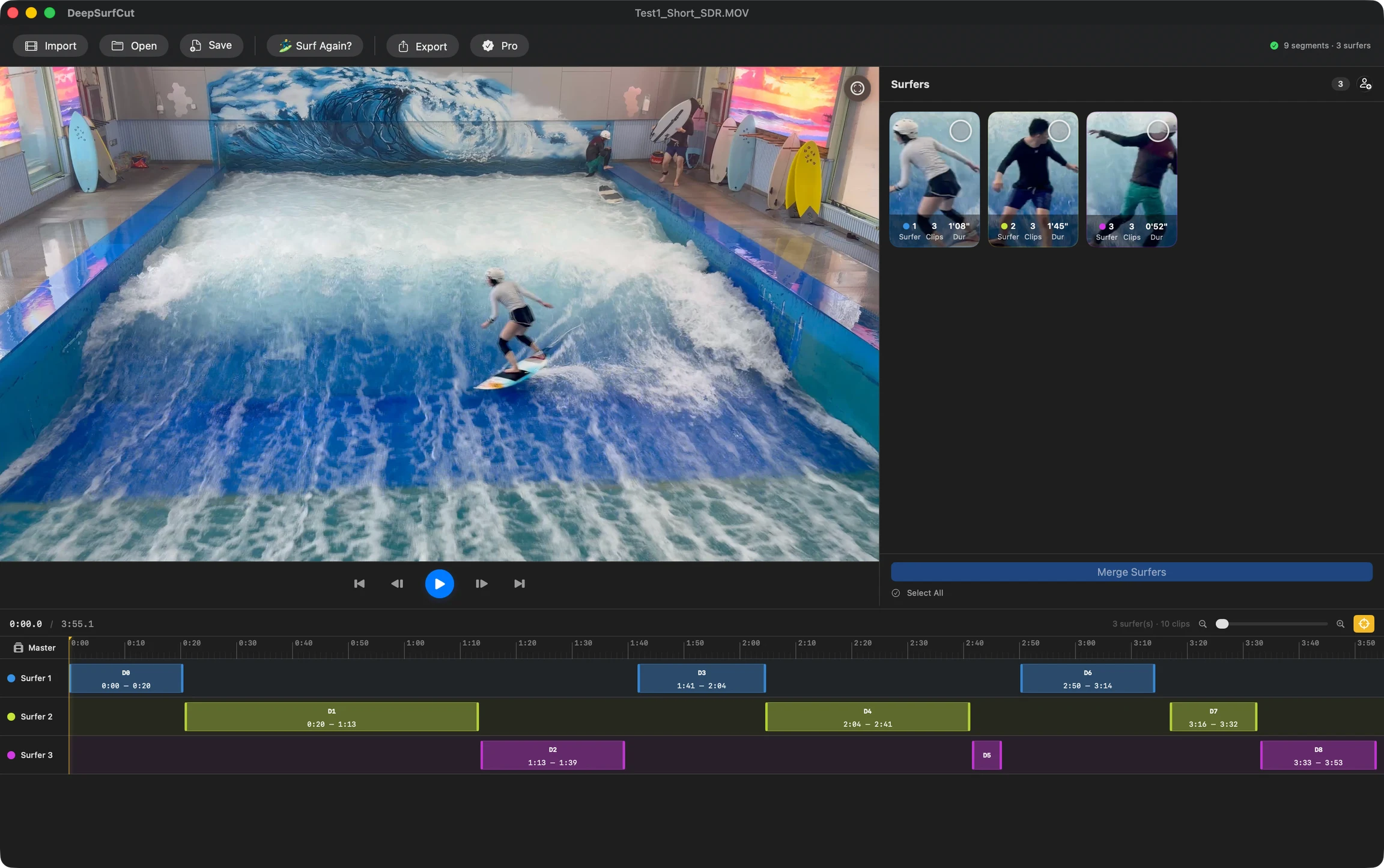
Rapid Surfing and standing waves: the core workflow
Rapid Surfing means riding natural or artificial standing waves. DeepSurfCut focuses on fixed-camera sessions on deep-water standing waves. One rider takes a turn, then the next. A continuous recording captures those turns along with the waiting in between. Rather than searching the whole video by hand, analyze the session and review a timeline organized by surfer.
The first pass is a starting point, not a locked edit. Check where each ride starts and ends, correct the surfer groups, and keep the moments you want. Each clip keeps its position in the original session, so it is easier to understand the order of the rides.
The term also covers river waves. For other recording conditions, try a representative video and check tracking and rider groups before batch export.
Looking for a place to ride? Use Rapid Surf Map to browse the deep-water standing-wave venue directory, check sources and operator information, and open directions. Confirm sessions and availability with the venue before visiting.
FlowRider and flowboarding footage
FlowRider footage can also be used with DeepSurfCut. Flowboarding has its own boards and riding style; it is not the same as surfing a deep-water standing wave. The editing need is still familiar: a long recording, riders taking turns, and separate videos to share afterward.
Use a stable view of the whole riding surface and review a representative recording first. Different riding positions, falls, spray and overlapping people can affect detection, grouping and follow framing. DeepSurfCut is especially tailored to deep-water standing-wave surfing, so do not assume identical results across all FlowRider sessions.
Other artificial waves and ocean surfing
Other surfing footage is not excluded. The closer the recording is to one stable, clear view with distinct rides, the closer it is to DeepSurfCut’s intended workflow. A moving camera, changing wave positions or distant surfers can make automatic analysis harder.
For ocean sessions, drone shots and handheld follow footage, try a representative recording and inspect the results before relying on batch export. DeepSurfCut does not promise the same automated results for every surf setting, or automatically decide which maneuvers are your best.
Record for a cleaner first pass
Keep the entry, riding zone and fall area visible. Mount the camera, avoid repeated zooming and panning, and make sure riders remain large enough to see. Clear light and a high-quality source give tracking and grouping better material to work with.
Import the full MOV or MP4 recording. Check the surf area before analysis, then review the detected rides. If a clip belongs to the wrong person, move it to the right surfer track; adjust boundaries before preparing the final export.
Choose individual rides, a reel or Portrait Follow
Export separate ride clips when each turn needs its own file, or combine a surfer’s rides into one reel. Keep some footage before and after a ride when the entry or ending matters. Keep the original audio and add an optional wave end card.
For a vertical edit, Portrait Follow creates a 9:16 video that follows the selected surfer inside the original recording. It reframes existing footage; it does not add a new camera angle. Check the crop throughout the ride. Follow quality depends on the recording and tracking results; older projects without follow data need to be analyzed again.
Edit on the screen that fits the session
Use iPhone for a quick review and sharing after a ride, iPad for touch editing on a larger screen, or Mac for longer sessions. Analysis happens on your device: you do not need to upload your source video for the edit.
Keep the originals, review the finished files, and share only footage you have permission to use. For recording advice, device compatibility or an editing issue, visit DeepSurfCut support.
See the real Portrait Follow comparison
Portrait Follow tutorial: make a 9:16 surf video
Questions before your next session
Can I use DeepSurfCut with FlowRider footage?
Yes. FlowRider is a compatible use case, though the app is more specifically tailored to deep-water standing-wave sessions. Use clear, fixed-camera footage and check the detected rides and surfer groups before exporting.
Do I have to shoot vertically for Portrait Follow?
No. Portrait Follow crops your existing recording into a moving 9:16 frame around the selected surfer. Keep enough source detail and space around the rider for the crop, and review the actual export.
Will every rider be grouped correctly automatically?
Not always. Occlusion, lighting, spray, camera movement and similar appearances can affect results. The timeline lets you correct groups and clip boundaries before sharing.